Sunday evening, in thousands of small businesses, someone finishes next week's rota in a spreadsheet, takes a screenshot and posts it in the group chat. By Monday lunchtime a shift has been swapped and the screenshot is wrong.
Why screenshots don't work
- They're out of date the moment anything changes.
- People scroll up and find last week's version by mistake.
- Everyone sees everyone else's shifts, which isn't always appropriate.
- There's no history of changes, just a pile of newer screenshots.
- Holiday requests happen in private messages and get forgotten.
Think of a rota as a list of shifts
A rota is really just a list. Each shift has a person, a day, a start time, an end time and a place. Once you think of it like that, instead of as a grid somebody draws every week, most of the problems go away. One shift can change without redrawing the whole week.
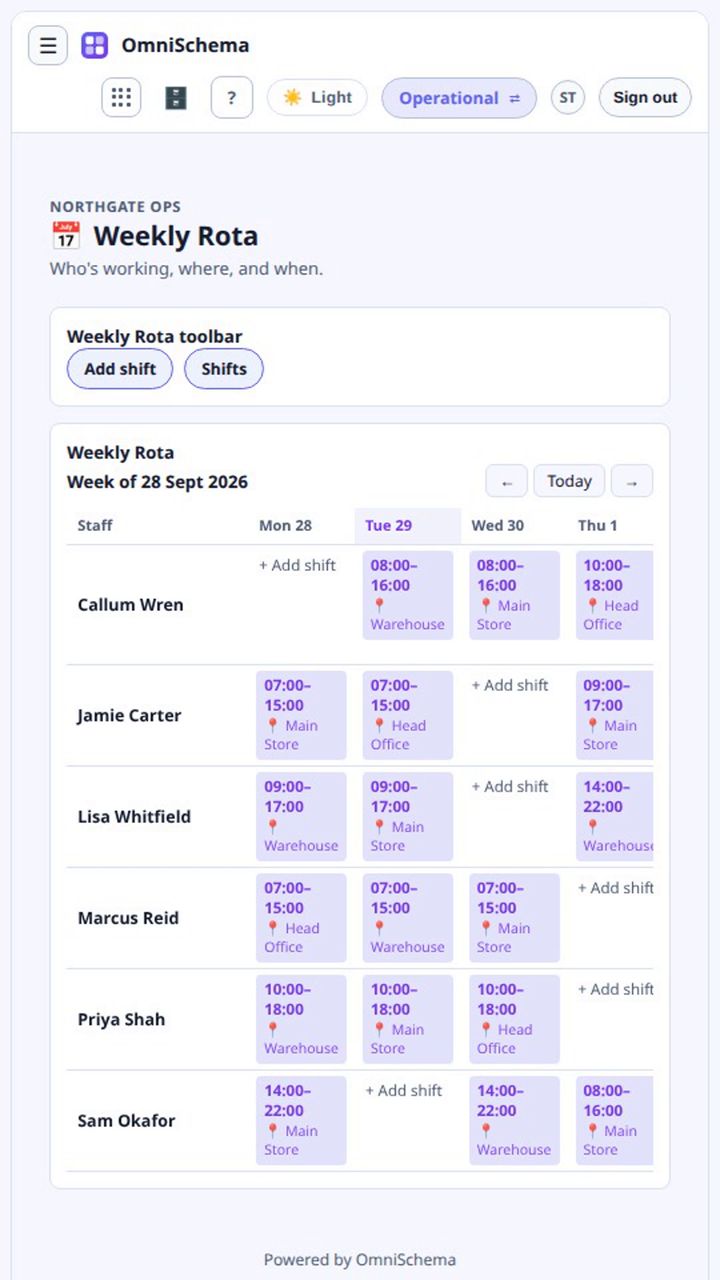
One live rota
The rota should be a single live screen everybody looks at. If a manager moves a shift at ten o'clock, the person working it sees the change at one minute past, not when the next screenshot goes up.
Everyone sees their own shifts
In agencies, cleaning companies and security firms especially, staff often shouldn't see everyone's shifts. It's simpler for them and kinder to everyone's privacy. Managers still need the whole picture, and the same rota should give each group the view they need.
Put leave in the same place
Holidays change the rota directly. If leave requests live somewhere else, clashes are guaranteed. Requests should be made and approved in the same system, by someone with the authority to approve them.
OmniSchema's Weekly Rota shows every person and every shift, week by week or across a month. Each shift carries its own work location, so the same person can be at different sites on different days. Once staff logins are linked, you can set it so people only see their own shifts while managers see the lot, and leave requests sit right alongside.